오늘의 학습 !
java.util.function 패키지
java.util.function 패키지는 자주 사용되는 다양한 함수형 인터페이스 제공!
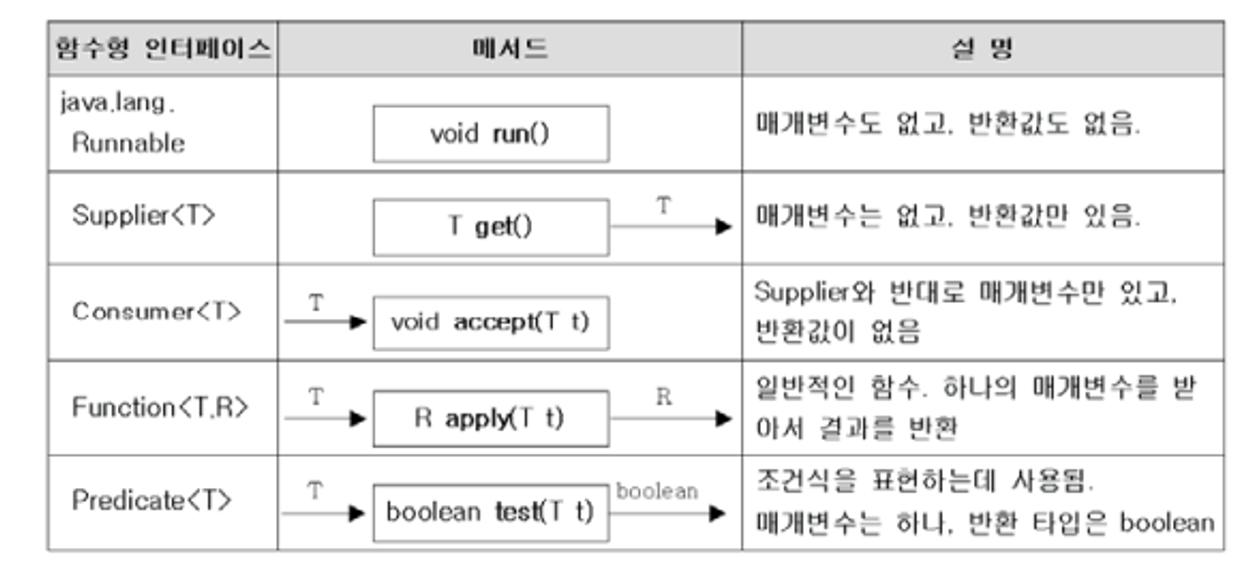
Runnable
매개변수와 리턴 값 모두 없는 경우
package java.lang;

@FunctionalInterface
public interface Runnable {
    public abstract void run();
}
Runnable r = () -> System.out.println("출력문 테스트");
r.run();    // "출력문 테스트"
Supplier<T>
매개변수는 없고, 리턴값(타입)이 존재
package java.util.function;

@FunctionalInterface
public interface Supplier<T> {
    T get();
}
Supplier<String> s = () -> "리턴되는 값";
String result = s.get();
System.out.println(result);   // "리턴되는 값"
Consumer<T>
매개변수는 있지만 리턴값이 없음!
package java.util.function;

@FunctionalInterface
public interface Consumer<T> {
    void accept(T t);
}
Consumer<String> c = (a) -> System.out.println(a);
c.accept("consumer");
Function<T, R>
하나의 매개변수를 받아 하나의 결과를 리턴한다.
package java.util.function;

@FunctionalInterface
public interface Function<T, R> {
    R apply(T t);
}
Function<Integer, String> f = a -> String.valueOf(a);
Function<String, Integer> f2 = b -> {
    return Integer.valueOf(b) + 100;
};
Predicate<T>
조건식 표현 사용 / 매개변수는 하나 리턴타입 boolean 함수형 인터페이스
package java.util.function;

@FunctionalInterface
public interface Predicate<T> {
    boolean test(T t);
}
Predicate<String> isEmptyStr = s -> s.length()==0;
String str = "";
if (isEmptyStr.test(str)) { // if(s.length()==0)
		System.out.println("This is an empty String.")
}
// 스트림에서 filter메소드 내부에는 Predicate 타입이 들어감
List<Integer> list = Arrays.asList(1,2,3,4,5);
list.stream()
		.filter(x -> x%2==0)
		.collect(Collectors.toList()); // [2,4]
메소드 참조
Method Reference, 메소드를 참조해 매개변수의 정보 리턴타입을 알아내 람다신에서 불필요한 변수 제거 목적
하나의 메소드를 호출하는 람다식은 메소드 참조로 간단히 변경가능!
|
종류
|
람다
|
메소드 참조
|
|
정적(static) 메소드 참조
|
(x) → ClassName.method(x)
|
ClassName::method
|
|
인스턴스 메소드 참조
|
(obj, x) → obj.method(x)
|
ClassName::method
|
(left, right) -> Math.max(left, right);에서
Math::max; // 메소드 참조
메소드 참조로 깔끔하게 처리!
@FunctionalInterface
public interface IntBinaryOperator {
    int applyAsInt(int left, int right);
}

// Math.max 메소드
public static int max(int a, int b) {
    return Math.max(a, b);
}
람다식을 '메소드참조'로 더욱 간단하게 변경해가는 과정

// 1단계
IntBinaryOperator operator = (a, b) -> Math.max(a, b);

// 2단계
IntBinaryOperator operator = Math::max;   // 메소드 참조
메소드 참조로 1단게에서 2단계로 간단하게 표현이 가능하다!
메소드 참조는 정적메소드, 인스턴스 메소드, 생성자 참조도 가능
정적 메소드 및 인스턴스 메소드 참조
정적(static)메소드 참조 경우, 클래스이름 뒤에 :: 기호 붙이면 된다!
클래스::메소드
인스턴스 메소드일 경우, 객체 생성 후 참조변수뒤에 :: 기호 붙이면 된다!
참조변수::메소드
예시를 보면,
public class MethodReferenceExample {
    public static void main(String[] args) {
        IntBinaryOperator operator;

        // 정적 메소드 참조
        operator = (x, y) -> Calculator.staticMethod(x, y);
        System.out.println("결과1: " + operator.applyAsInt(1, 2));

        operator = Calculator::staticMethod;
        System.out.println("결과2: " + operator.applyAsInt(3, 4));

        // 인스턴스 메소드 참조
        Calculator calculator = new Calculator();
        operator = (x, y) -> calculator.instanceMethod(x, y);
        System.out.println("결과3: " + operator.applyAsInt(5, 6));

        operator = calculator::instanceMethod;
        System.out.println("결과4: " + operator.applyAsInt(7, 8));
    }
}
정적 메소드 참조의 경우,
결과1은 람다식 결과2는 메소드 참조 대체 코드
확실히 메소드 참조가 더 보기 편하네용ㅎㅎㅎㅎ
인스턴스 메소드의 경우도 동일하게
결과3 : 람다식 결과4 : 메소드참조
확실히 간단하게 변경하니 훨씬 깔끔해졌네엽!!!!!
익숙해진다면 아주 편리할거같아요 ㅎㅎㅎ

매개변수의 메소드 참조
(a, b) -> { a.instanceMethod(b); }
클래스::instanceMethod
람다식에서 제공되는 a 매개변수의 메소드를 호출해 b매개변수를 매개값으로 사용하는 경우
a의 인스턴스 메소드가 참조되므로 전혀 다른 코드가 실행된다.
import java.util.function.ToIntBiFunction;

public class ArgumentMethodReferencesExample {
        public static void main(String[] args) {
            ToIntBiFunction<String, String> function;

            function = (a, b) -> a.compareToIgnoreCase(b);
            print(function.applyAsInt("Java8", "JAVA8"));

            function = String::compareToIgnoreCase;
            print(function.applyAsInt("Java8", "JAVA8"));
        }

        public static void print(int order) {
            if (order < 0) {
                System.out.println("사전순으로 먼저 옵니다.");
            } else if (order == 0) {
                System.out.println("동일한 문자열");
            } else {
                System.out.println("사전순으로 나중에 옵니다.");
            }
        }
    }
생성자 참조
객체를 생성한다는 것을 의미
(a, b) -> { return new 클래스(a, b); }
람다식의 경우 객체 생성후 리턴
이것을 메소드 참조로 표현하면?
클래스 :: new
@FunctionalInterface
public interface Function<T, R> {
    R apply(T t);
}

@FunctionalInterface
public interface BiFunction<T, U, R> {
    R apply(T t, U u);
}
public class Member {
    private String name;
    private String id;

    public Member() {
    }

    public Member(String id) {
        System.out.println("Member(id) 생성자 실행");
        this.id = id;
    }

    public Member(String name, String id) {
        System.out.println("Member(id, name) 생성자 실행");
        this.name = name;
        this.id = id;
    }

    public String getId() {
        return id;
    }
}
public class ConstructorReferencesExample {
    public static void main(String[] args) {
        Function<String, Member> function1 = Member::new;
        Member member1 = function1.apply("angel");

        BiFunction<String, String, Member> function2 = Member::new;
        Member member2 = function2.apply("angel", "devil");
    }
}
스트림
- 데이터 흐름
예시
List의 숫자들 중에 짝수만 출력하는 소스코드
스트림을 사용하지 않았을 때)
List<Integer> numbers = Arrays.asList(1, 2, 3, 4, 5, 6, 7, 8, 9, 10);

for (int n: numbers) {
	if (n % 2 == 0) {
		System.out.println(n);
	}
}
스트림을 사용했을 때)
List<Integer> numbers = Arrays.asList(1, 2, 3, 4, 5, 6, 7, 8, 9, 10);

numbers.stream()
	.filter(n -> n % 2 == 0)
	.forEach(System.out::println);
스트림은 배열과 컬렉션을 처리할때 for,while문처럼 반복문을 사용하지 않고
함수형으로 처리하는데 데이터 처리과정을 filter,forEach을 사용하여 가독성을 높인다!
| 생성 : 스트림 인스턴스 생성 (배열이나 컬렉션을 스트림 인스턴스로 변환) 가공 : 원하는 결과를 만들어가는 중간 작업 가공 : 원하는 결과를 만들어가는 중간 작업 |
각 단계 (생성, 가공, 결과)마다 데이터를 다루기위한 함수가 존재
스트림의 종류
“java.util.stream” 패키지에는 스트림 인터페이스가 정의되어있고 BaseStream을 부모로해서 자식 인터페이스들이 다음과 같이 상속 구조를 이루고 있다.
| 이름 | 설명 |
|
BaseStream
|
모든 스트림에서 사용할 수 있는 공통 메소드들이 정의되어 있습니다. 코드에서 직접 사용하지는 않습니다.
|
|
Stream
|
객체 요소를 처리하는 스트림입니다.
|
|
IntStream
|
int 형을 처리하는 스트림입니다.
|
|
LongStream
|
long 형을 처리하는 스트림입니다.
|
|
DoubleStream
|
double 형을 처리하는 스트림입니다.
|
스트림을 만드는 방법
1. 컬렉션으로부터 스트림 생성
컬렉션 타입(Collection, List, Set)의 경우 디폴트 메소드 stream을 이용하여 스트림을 만들 수 있다.
List<String> list = Arrays.asList("a", "b", "c", "d", "e");

Stream<String> stream = list.stream();
stream.forEach(System.out::println);
2. 배열로부터 스트림 생성
String[] arr = new String[]{"a", "b", "c", "d", "e"};

Stream<String> stream = Arrays.stream(arr);
stream.forEach(System.out::println);
3. 숫자 범위로부터 스트림 생성
IntStream intStream = IntStream.range(1, 5);	// [1, 2, 3, 4]
LongStream longStream = LongStream.rangeClosed(1, 5);	// [1, 2, 3, 4, 5]
range 와 rangeClosed 의 차이는 두번째 인자 범위가 포함되느냐 안되느냐의 차이!
4. 파일로부터 스트림 생성
// File 클래스
Stream<String> fileStream = Files.lines(Paths.get("file.txt"), Charset.forName("UTF-8"));
fileStream.forEach(System.out::println);

// BufferedReader 클래스
FileReader fileReader = new FileReader(Paths.get("file.txt").toFile());
BufferedReader br = new BufferedReader(fileReader);
stream = br.lines();
stream.forEach(System.out::println);
5. 스트림 연결
Stream<Integer> stream1 = Stream.of(1, 2, 3);
Stream<Integer> stream2 = Stream.of(4, 5, 6);

Stream<Integer> newStream = Stream.concat(stream1, stream2);
newStream.forEach(System.out::println); // 1, 2, 3, 4, 5, 6
필터링 - distinct, filter
distinct
- 중복을 제거하기 위해 사용
List<String> list = Arrays.asList("a", "b", "b", "c", "d");

// [a, b, c, d]
list.stream()
	.distinct()
	.forEach(System.out::println);
distinct을 사용하여 리스트 안의 b문자열의 중복을 제거 해주는 코드!
filter
true인것만 필터링!
List<String> list = Arrays.asList("김밥", "김밥", "김치", "나비", "나방");

// [김밥, 김밥, 김치]
list.stream()
	.filter(str -> str.startsWith("김"))
	.forEach(System.out::println);
리스트 중 김으로 시작하는 문자열만 골라서 출력하는 코드!
filter을 사용하여 김으로 시작하는 문자열만 true이므로 그것만 출력한다!
여기서 출력값은 [김밥,김밥,김치] 가 되는데
중복되므로 여기서 distinct을 같이 사용하면?
List<String> list = Arrays.asList("김밥", "김밥", "김치", "나비", "나방");

// [김밥, 김치]
list.stream()
	.filter(str -> str.startsWith("김"))
	.distinct()
	.forEach(System.out::println);
이렇게 김밥,김치만 출력값이 나오게된다!
오늘도 이렇게 람다식과 스트림 살짝! 배웠는데용 ㅎㅎ
음.. 람다식이랑 스트림이 쓰면 정말
간편하고 간단하게 코드를 사용할 수 있을 거같은데
이게 개념은 이해해도 익숙하지 않다보니
처음부터 작성하라고 하면
되게 머엉---해지네요......ㅠ
정말 코딩은 연습만이 살길이네욬ㅋㅋㅋㅋㅋㅋㅋㅋㅋ큐ㅠㅠㅠㅠㅠ
오늘 배운내용 자바의정석으로 한번 복습하고 sql 공부해야겠어엽 ㅠㅠㅠㅠㅠ
오늘도 열심히 공부했구용 ㅎㅎㅎ
내일도 파이팅!!!!!!!!

가면 갈수록 이해가 안되기 보단 코드 작성하는 게 익숙하지 않은상태에서
뭔가 간편하게 코드 작성하는걸 배우니 더 헷갈리는 감이 없지 않아 있는 느낌이랄까요 ?
앞에 배운 부분의 실습이 완벽하지 않은데
뒤에 람다식 스트림으로 코드를 간결하게 만드니 더 헷갈리고 익숙치 않네욥 ㅠㅠㅠㅠㅠㅠ
흐엉흐엉...

'[4기] 백엔드 개발자 부트캠프 "오르미" ~ing > [4기] 백엔드 개발자 부트캠프 오르미 수업 복습' 카테고리의 다른 글
| [4기] 51일차 SQL( 데이터베이스 및 SQL 실습환경 셋팅 ) (0) | 2024.02.21 |
|---|---|
| [4기] 50일차 Java ( 스트림 ) (2) | 2024.02.20 |
| [4기] 46일차 Java ( Collection - Map, 람다식 ) (4) | 2024.02.16 |
| [4기] 45일차 Java ( Collection - list,set ) (0) | 2024.02.15 |
| 일기) DailyQuiz9 (제네릭) (0) | 2024.02.14 |