HTML 파일
< bookManager.html >
<!DOCTYPE html>
<html lang="kr" xmlns:th="http://www.thymeleaf.org">
<head>
    <meta charset="UTF-8">
    <title>book</title>
</head>
<body>
<!-- book 추가할 수 있는 폼 -->
<h3>책 정보 입력</h3>
<form th:action="@{/books}" method="post">
    <table>
        <tbody>
        <tr>
            <td>id</td>
            <td><input type="text" name="id"></td>
        </tr>
        <tr>
            <td>name</td>
            <td><input type="text" name="name"></td>
        </tr>
        <tr>
            <td>author</td>
            <td><input type="text" name="author"></td>
        </tr>
        <tr>
            <td colspan="2">
                <button type="submit">추가</button>
            </td>
        </tr>
        </tbody>
    </table>
</form>

<!-- 등록된 책 전체 목록 -->
<h3>등록된 책 목록</h3>
<ul>
    <li th:each="book: ${bookList}">
        <a th:href="@{/books/{id}(id = ${book.id})}"><span th:text="${book.id}"></span></a>
    </li>
</ul>

</body>
</html>
< bookDetail.html >
<!DOCTYPE html>
<html lang="en">
<head>
    <meta charset="UTF-8">
    <title>Title</title>
</head>
<body>
<!-- 특정 책 조회 -->
<table>
    <tbody>
    <tr>
        <td>id</td>
        <td>name</td>
        <td>author</td>
    </tr>
    <tr>
        <td th:text="${book.id}"></td>
        <td th:text="${book.name}"></td>
        <td th:text="${book.author}"></td>
    </tr>
    </tbody>
</table>
</body>
</html>
Model(책 정보) 정의
package com.example.hellospring.controller;

import lombok.AllArgsConstructor;
import lombok.Getter;
import lombok.Setter;

@Getter
@Setter
@AllArgsConstructor

public class BookDTO {

        private String id;
        private String name;
        private String author;
}
BookController
import com.example.hellospring.repository.BookRepository;
import lombok.extern.slf4j.Slf4j;
import org.springframework.stereotype.Controller;
import org.springframework.ui.Model;
import org.springframework.web.bind.annotation.GetMapping;
import org.springframework.web.bind.annotation.PathVariable;
import org.springframework.web.bind.annotation.PostMapping;
import org.springframework.web.bind.annotation.RequestParam;

import java.util.List;

@Slf4j
@Controller
public class BookController {

    private  final BookRepository bookRepository;

    public BookController(BookRepository bookRepository){
        this.bookRepository = bookRepository;
    }

    @GetMapping("/books")
    public String home(Model model){
        List<BookDTO> bookList = bookRepository.getAllBooks();
        model.addAttribute("bookList", bookList);
        return "bookManager";
    }

    @PostMapping("/books")
    public String saveBook(@RequestParam("id") String id,
                           @RequestParam("name") String name,
                           @RequestParam("author") String author){
        System.out.println( id + name + author);

        //todo save
            bookRepository.saveBook(new BookDTO(id, name, author));

        return  "redirect:/books";
        //기본 메소드 : /books > get메소드로 호출됨 ( 내부처리 후 GET/books 호출 )
        // redirect : 사용자가 처음 요청한 url 이아닌 다른 url로 보내는 것
    }

    @GetMapping("/books/{id}")
    public  String detail(@PathVariable("id") String isbn,Model model){
        System.out.println("isbn = " + isbn);
        log.info("isbn = " + isbn); //출력하고싶은 문자열 입력

        //TODO 화면에 보여줄 book

        BookDTO book = bookRepository.getBook(isbn);
        model.addAttribute("book", book);
        //model.addAttribute("book", bookRepository.getbook(isbn)); 바로 넣을 수도 있음

        return "bookDetail";
    }

}
BookRepository
package com.example.hellospring.repository;

import com.example.hellospring.controller.BookDTO;
import org.springframework.stereotype.Repository;

import java.util.ArrayList;
import java.util.HashMap;
import java.util.List;
import java.util.Map;

@Repository
public class BookRepository {

    private Map<String, BookDTO> bookMap;

    public BookRepository(){
        bookMap = new HashMap<>();
        BookDTO book1 = new BookDTO(
                "123","오늘도 개발자가 안된다고 말했다.","기획자");
        BookDTO book2 = new BookDTO(
                "978-59-98139-79-6","객체지향의 사실과 오해","조영호");
        bookMap.put(book1.getId(),book1);
        bookMap.put(book2.getId(),book2);
    }

    public List<BookDTO> getAllBooks(){
        List<BookDTO> bookList = new ArrayList<>();
        for(Map.Entry<String, BookDTO> book : bookMap.entrySet()){
            bookList.add(book.getValue());
        }
        return bookList;
    }

    public BookDTO getBook(String isbn){
        return  bookMap.get(isbn);
    }

    public void saveBook(BookDTO book){
        bookMap.put(book.getId(), book);
    }
}
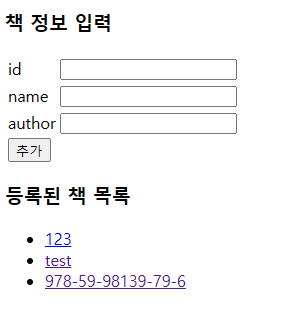
실행 하면?
오늘은 동적페이지 구현하는 것을 실습해보았는데.........................
강사님이랑 같이하면 이해를 하다가도
다시 작성해봐야지! 하면 막막하달까요........................................ㅜ
너무어렵당..스프링자식,,,,,,,,,,,,,,,,,,,,,,,,,,,,,,,,,,,봄아니야 넌,,,,,,ㅜ
일단 한번 코드 다시 살펴보고 SQL 공부해야할 거 같아요! ㅠㅠ 이번주 시험,,, 망했다,.,,,,,,,,,,,
최대한 공부해보고 안되면,,,,, 다음 시험을 기약하며,,,,, ㅠ 일단 처음 어떤식으로 나오는지 최대한 보는걸로,,, ㅠ!!!!!
스프링,,넌,,주말에 ,,,,찢어야지,,,,ㅠㅋㅋㅋ

'[4기] 백엔드 개발자 부트캠프 "오르미" ~ing > [4기] 백엔드 개발자 부트캠프 오르미 수업 복습' 카테고리의 다른 글
| [4기] 105일차 Docker1 (0) | 2024.04.15 |
|---|---|
| [4기] 73일차 AWS( 클라우드 서버 (2) | 2024.03.14 |
| [4기] 63일차 SpringBoot(디렉터리 구성 및 발전시키기) (0) | 2024.03.04 |
| [4기] 58일차 SQL( 데이터모델링과 ERD ), Spring이란? (2) | 2024.02.28 |
| [4기] 57일차 SQL( DDL,DCL ) (0) | 2024.02.27 |